WPSAL (Simple Access List)
Lightweight WordPress plugin that allows site owners to control access to posts, pages and custom post types
We have ONE goal in mind: making it easy to control access to pages and posts!
This plugin lets you restrict content to specific users or roles and redirect unauthorized visitors to any page. Ideal for: membership sites, client portals, private blogs, or any scenario requiring flexible content access control.
Key Features
Lightweight, fast, and built for developers.
Restrict access to posts, pages or custom post types.
Assign access to individual users or roles.
Redirect unauthorized visitors to a page of your choice.
Developer-friendly with filters and hooks.
How Does It Work?
- Upload the
wpsal-simple-access-listfolder to/wp-content/plugins/. - Activate the plugin through the Plugins menu in WordPress.
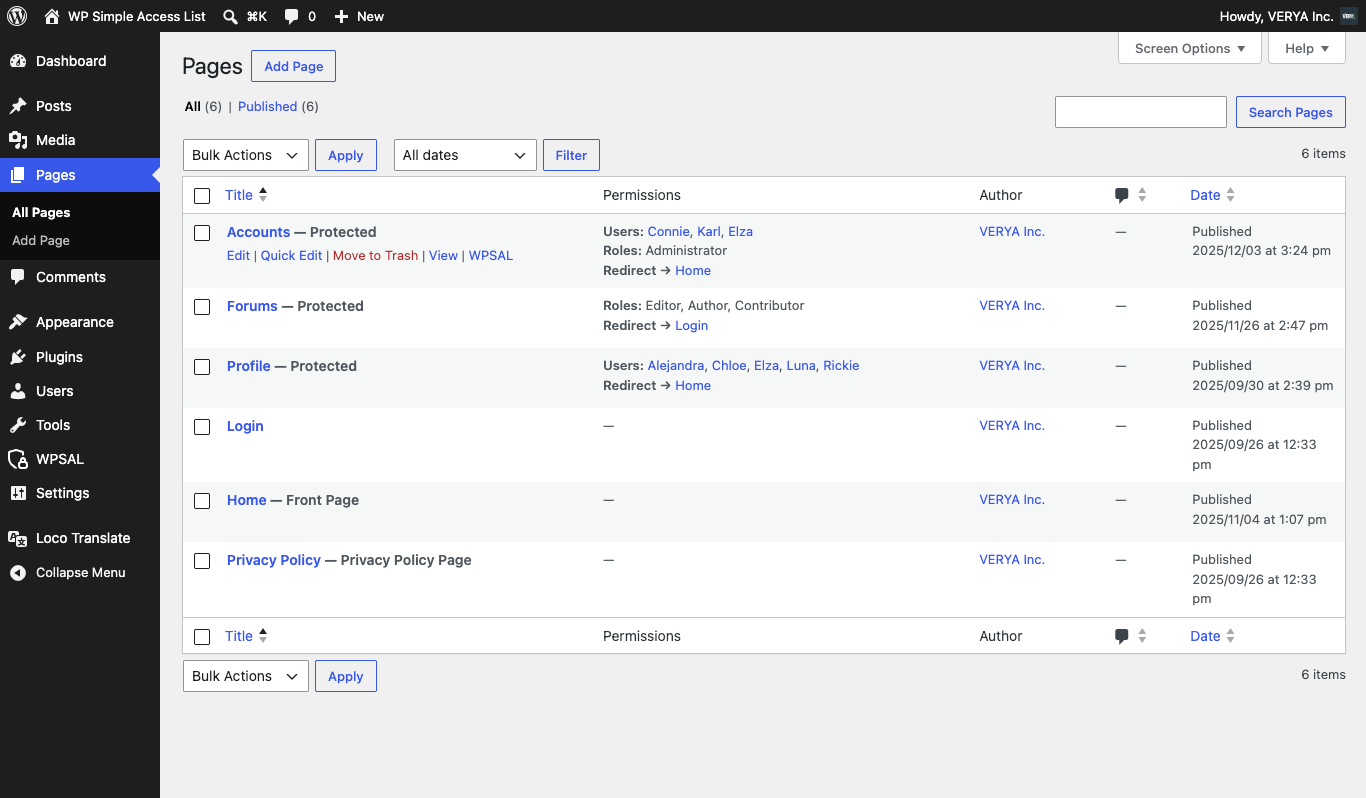
- Go to the Posts, Pages, or any custom post type list in the WordPress admin.
- Hover over a post row to reveal the WPSAL action menu. Click it.
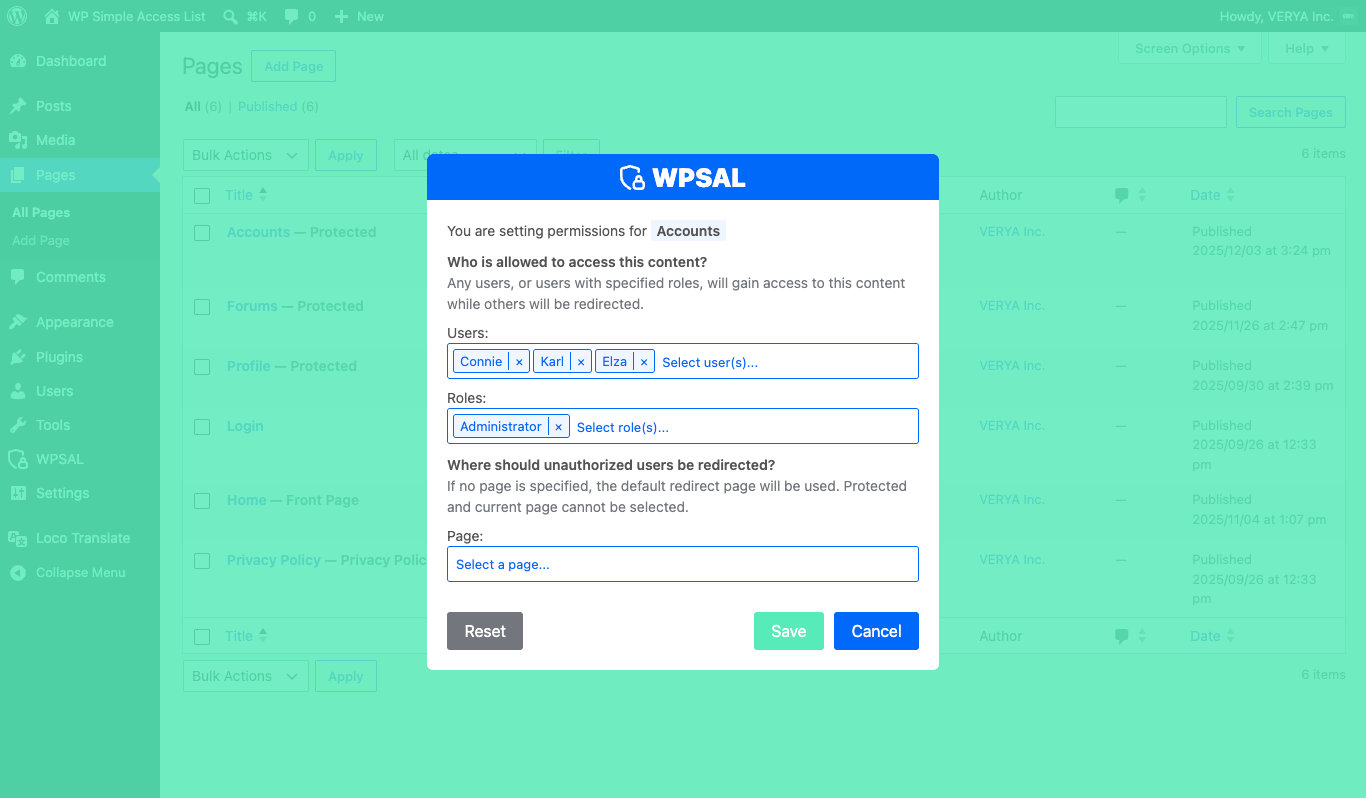
- In the modal that appears, select the allowed users and/or roles.
- Optionally select a redirect page for unauthorized visitors.
- Click Save — the access restrictions are applied immediately.
Documentation
Quick integration for developers and agencies.
wpsal_allowed_post_types
wpsal_allowed_post_types Description
Filters the list of post types WPSAL applies its access-restriction features to — the action menu in admin post lists, the restriction modal, and the front-end access checks. By default, only post and page are supported; use this filter to add any custom post type you want WPSAL to manage, or to remove one you don’t.
Changelog
- Added in version 1.0.0.
Parameters
apply_filters('wpsal_allowed_post_types', $post_types);
$post_types— (array) An array of post type slugs WPSAL currently manages. Defaults to['post', 'page'].
Return
(array)— The modified array of post type slugs WPSAL should manage.
Example
Add a custom post type, movie, to the list WPSAL manages:
					add_filter('wpsal_allowed_post_types', function($post_types) {
    $post_types[] = 'movie';
    return $post_types;
});
wpsal_filter_roles
wpsal_filter_roles Description
Fires when WPSAL builds the list of roles shown in the restriction modal’s role picker, via the wpsal_get_roles AJAX endpoint. Use it to add, remove, or reorder role entries before they reach the frontend — handy for hiding roles like administrator that shouldn’t be restrictable, or for filtering out custom roles added by other plugins.
Changelog
- Added in version 1.0.0.
Parameters
apply_filters('wpsal_filter_roles', $roles);
$roles— (array) An array of role items. Each item contains:slug— (string) The role sluglabel— (string) The role label, name
Return
(array)— The modified array of role items, structured the same as the input: each element includesslugandlabel.
Example
Remove the author role from the picker:
					add_filter('wpsal_filter_roles', function($roles) {
    $roles = array_values(
        array_filter($roles, fn($r) => $r['slug'] !== 'author')
    );
    return $roles;
});
wpsal_filter_users
wpsal_filter_users Description
Fires when WPSAL builds the list of users shown in the restriction modal’s user picker, via the wpsal_get_users AJAX endpoint. Use it to add, remove, or adjust user entries before they reach the frontend — for example, to exclude service accounts or hide users below a certain role.
Changelog
- Added in version 1.0.0.
Parameters
apply_filters('wpsal_filter_users', $users);
$users— (array) An array of user items. Each item contains:id— (string) The user IDname— (string) The display nameemail— (string) The email address
Return
(array)— The modified array of user items, structured the same as the input: each element includesid,name, andemail.
Example
Exclude a specific user by email from the picker:
					add_filter('wpsal_filter_users', function($users) {
    $users = array_values(
        array_filter($users, fn($u) => $u['email'] !== 'john@doe.com')
    );
    return $users;
});
wpsal_permissions_column_post_types
wpsal_permissions_column_post_types Description
Filters which post types display WPSAL’s permissions column in the admin post list. Use this to hide the column on specific post types even when they’re included in wpsal_allowed_post_types — handy when a post type’s list table is already crowded with columns from other plugins.
Note: Using this filter overrides the “Show permissions column” plugin setting for the affected post types.
Changelog
- Added in version 1.0.1.
Parameters
apply_filters('wpsal_permissions_column_post_types', $allowed_post_types);
$allowed_post_types— (array) An array of allowed post types.
Return
(array)— The filtered array of post type slugs that should have the WPSAL permissions column.
Example
Hide the WPSAL permissions column for the movie post type:
					add_filter('wpsal_permissions_column_post_types', function($allowed_post_types) {
    return array_values(array_diff($allowed_post_types, ['movie']));
});
There are no actions at the moment.
There are no hooks at the moment.
Help Us Translate!
We're developers, not polyglots...
If you’d like to help translate the plugin into your language, we’d be incredibly grateful. Your contribution will help users from around the world enjoy the plugin in their native language. Thank you!
FAQ
For support or to report bugs, please visit the plugin page on the WordPress repository.
Can I restrict custom post types?
Yes! By default, posts and pages are supported.
Use the wpsal_allowed_post_types filter to extend to custom post types.
Can I redirect unauthorized users?
Yes, you can select a custom page to redirect visitors who don’t have access.
Can I restrict access to both roles and users?
Absolutely. You can assign access to specific users, roles, or both simultaneously.
Is the plugin developer-friendly?
Yes, it provides filters and hooks for extending functionality and integrating with other plugins or themes.
Can I hide pages that are protected if they have WPSAL rules applied?
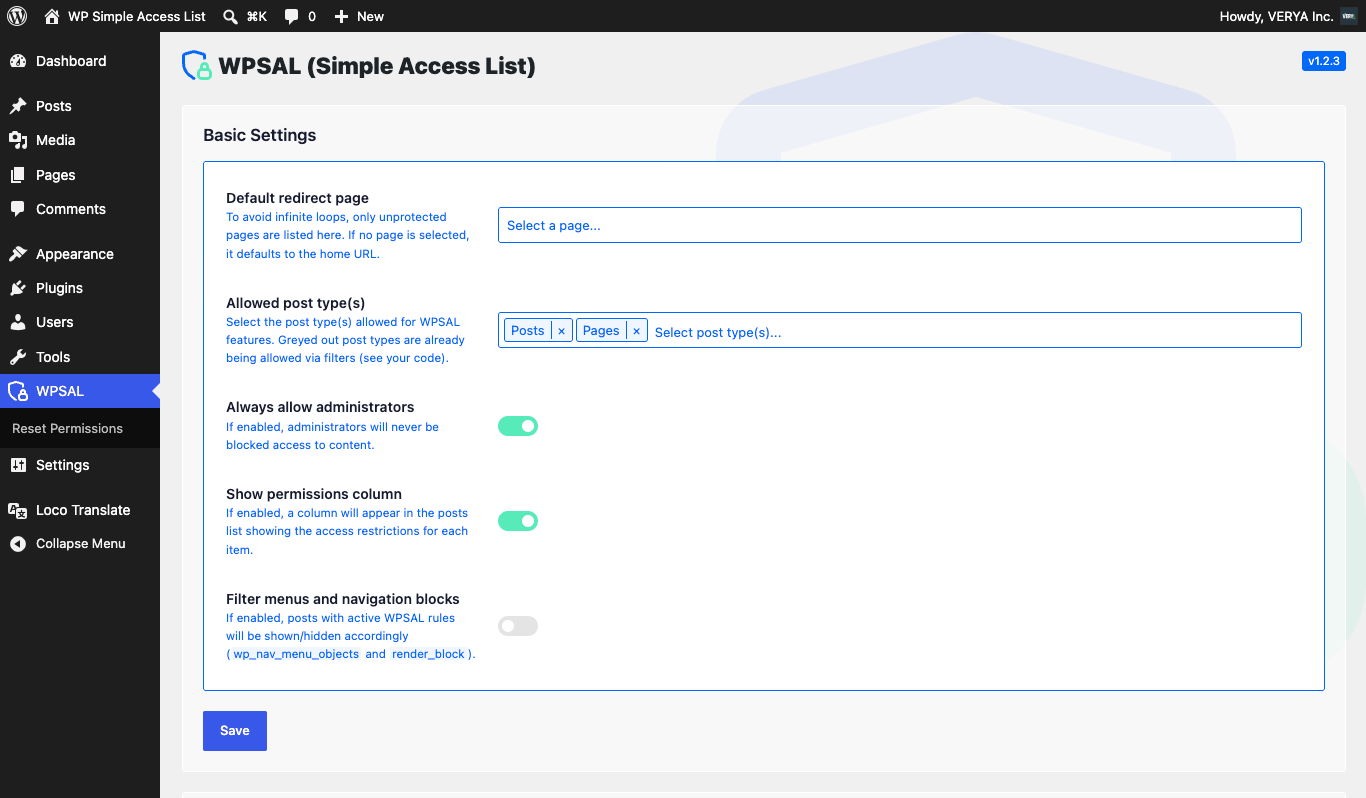
Yes! When the “Filter menus and navigation blocks” option is enabled in the plugin settings, the plugin automatically removes menu items and navigation block links that the current user cannot access.
If you enjoy using this plugin and want to support its development, you can make a donation here.
Thank you for helping me keep improving it!
© 2026 VERYA Inc. — 🍁 Proudly Canadian